ARTIST Tutorial: Single Heliostat Ray Tracing
Note
You can find the corresponding Python script for this tutorial here:
https://github.com/ARTIST-Association/ARTIST/blob/main/tutorials/01_single_heliostat_raytracing_tutorial.py
This tutorial provides a brief introduction to ARTIST showcasing how Heliostat Ray Tracing is performed for a single
heliostat. The tutorial will run through some basic concepts necessary to understanding ARTIST including:
How to load a scenario.
How to select specific heliostats for alignment and raytracing.
Activating the kinematic in the heliostats to align the heliostats for ray tracing.
Performing heliostat ray tracing to generate flux density images on the target areas on the tower.
Warning
This tutorial is specifically designed to help you get a feel for ARTIST and therefore only works for scenarios
containing one single heliostat. This is not how ARTIST is used in operation - for a more thorough overview
consider the tutorial on distributed raytracing.
Loading a Scenario
You can load any scenario for this tutorial, as long as it only contains a single heliostat! In the “scenarios” folder located within the tutorials folder we have included a single_heliostat_scenario.h5 which can be used with this tutorial.
Please adjust the path and name of the scenario_path variable:
# Specify the path to your scenario.h5 file.
scenario_path = pathlib.Path("please/insert/the/path/to/the/scenario/here/scenarios/single_heliostat_scenario.h5")
Once you have adjusted this parameter, you can load a scenario in ARTIST by simply calling the
load_scenario_from_hdf5() method, which is a Python classmethod that initializes a Scenario object based on
the configuration contained in the HDF5 file:
# Load the scenario.
with h5py.File(scenario_path) as scenario_path:
    scenario = Scenario.load_scenario_from_hdf5(
        scenario_file=scenario_path, device=device
    )
When loading the scenario, a large number of log messages are generated:
[2025-09-11 15:37:53,799][artist.scenario.scenario][INFO] - Loading an ``ARTIST`` scenario HDF5 file. This scenario file is version 1.0.
[2025-09-11 15:37:53,799][artist.field.tower_target_areas][INFO] - Loading the tower target areas from an HDF5 file.
[2025-09-11 15:37:53,799][artist.field.tower_target_areas][WARNING] - No curvature in the east direction set for the receiver!
[2025-09-11 15:37:53,799][artist.field.tower_target_areas][WARNING] - No curvature in the up direction set for the receiver!
[2025-09-11 15:37:53,799][artist.scene.light_source_array][INFO] - Loading a light source array from an HDF5 file.
[2025-09-11 15:37:53,799][artist.scene.sun][INFO] - Loading sun_1 from an HDF5 file.
[2025-09-11 15:37:53,800][artist.scene.sun][INFO] - Initializing a sun modeled with a multivariate normal distribution.
[2025-09-11 15:37:53,920][artist.scenario.scenario][WARNING] - No individual kinematic first_joint_translation_e for None set. Using default values!
[2025-09-11 15:37:53,920][artist.scenario.scenario][WARNING] - No individual kinematic first_joint_translation_n for None set. Using default values!
[2025-09-11 15:37:53,921][artist.scenario.scenario][WARNING] - No individual kinematic first_joint_translation_u for None set. Using default values!
[2025-09-11 15:37:53,921][artist.scenario.scenario][WARNING] - No individual kinematic first_joint_tilt_e for None set. Using default values!
[2025-09-11 15:37:53,921][artist.scenario.scenario][WARNING] - No individual kinematic first_joint_tilt_n for None set. Using default values!
[2025-09-11 15:37:53,921][artist.scenario.scenario][WARNING] - No individual kinematic first_joint_tilt_u for None set. Using default values!
[2025-09-11 15:37:53,921][artist.scenario.scenario][WARNING] - No individual kinematic second_joint_translation_e for None set. Using default values!
[2025-09-11 15:37:53,921][artist.scenario.scenario][WARNING] - No individual kinematic second_joint_translation_n for None set. Using default values!
[2025-09-11 15:37:53,921][artist.scenario.scenario][WARNING] - No individual kinematic second_joint_translation_u for None set. Using default values!
[2025-09-11 15:37:53,921][artist.scenario.scenario][WARNING] - No individual kinematic second_joint_tilt_e for None set. Using default values!
[2025-09-11 15:37:53,921][artist.scenario.scenario][WARNING] - No individual kinematic second_joint_tilt_n for None set. Using default values!
[2025-09-11 15:37:53,921][artist.scenario.scenario][WARNING] - No individual kinematic second_joint_tilt_u for None set. Using default values!
[2025-09-11 15:37:53,921][artist.scenario.scenario][WARNING] - No individual kinematic concentrator_translation_e for None set. Using default values!
[2025-09-11 15:37:53,921][artist.scenario.scenario][WARNING] - No individual kinematic concentrator_translation_u for None set. Using default values!
[2025-09-11 15:37:53,921][artist.scenario.scenario][WARNING] - No individual kinematic concentrator_translation_n for None set. Using default values!
[2025-09-11 15:37:53,921][artist.scenario.scenario][WARNING] - No individual kinematic concentrator_tilt_e for None set. Using default values!
[2025-09-11 15:37:53,921][artist.scenario.scenario][WARNING] - No individual kinematic concentrator_tilt_n for None set. Using default values!
[2025-09-11 15:37:53,921][artist.scenario.scenario][WARNING] - No individual kinematic concentrator_tilt_u for None set. Using default values!
[2025-09-11 15:37:53,921][artist.field.heliostat_field][INFO] - Loading a heliostat field from an HDF5 file.
[2025-09-11 15:37:53,922][artist.field.heliostat_field][INFO] - Individual surface parameters not provided - loading a heliostat with the surface prototype.
[2025-09-11 15:37:53,922][artist.field.heliostat_field][INFO] - Individual kinematic configuration not provided - loading a heliostat with the kinematic prototype.
[2025-09-11 15:37:53,922][artist.field.heliostat_field][INFO] - Individual actuator configurations not provided - loading a heliostat with the actuator prototype.
[2025-09-11 15:37:53,940][artist.field.heliostat_field][INFO] - Added a heliostat group with kinematic type: rigid_body, and actuator type: ideal, to the heliostat field.
These log messages consist of three brackets:
The first bracket, e.g.,
[2025-09-11 15:37:53,799], displays the time stamp.The second bracket, e.g.,
[artist.util.scenario], displays the file that generated the log message.The third bracket, e.g.,
[INFO]or[WARNING], displays the level for which the log message is being generated.Finally, after the three brackets, the log message is printed.
Whilst there are quite a few log messages, there are two important aspects you should note:
The majority of the messages are warnings – however, this is not a problem. We are considering a simplistic scenario, and as a result do not include specific kinematic or actuator parameters or deviations. Therefore,
ARTISTautomatically uses the default values. In this case, this is the desired behavior, and we can ignore the warnings!The remaining messages are info messages. These messages are informing us of the names of the objects being loaded from the HDF5 file, important information about these objects.
Before we start using this scenario, we can inspect it, for example by printing the scenario properties or investigating what type of light source and target area is included:
# Inspect the scenario.
print(scenario)
print(
    f"The light source is a {scenario.light_sources.light_source_list[index_mapping.first_light_source].__class__.__name__}."
)
print(f"The first target area is a {scenario.target_areas.names[index_mapping.first_target_area]}.")
print(
    f"The first heliostat in the first group in the field is {scenario.heliostat_field.heliostat_groups[index_mapping.first_heliostat_group].names[index_mapping.first_heliostat]}."
)
print(
    f"The location of {scenario.heliostat_field.heliostat_groups[index_mapping.first_heliostat_group].names[index_mapping.first_heliostat]} is: {scenario.heliostat_field.heliostat_groups[index_mapping.first_heliostat_group].positions[index_mapping.first_heliostat].tolist()}."
)
This code generates the following output:
ARTIST Scenario containing:
    A Power Plant located at: [0.0, 0.0, 0.0] with 1 Target Area(s), 1 Light Source(s), and 1 Heliostat(s).
The light source is a Sun.
The first target area is a receiver.
The first heliostat in the first group in the field is heliostat_1.
The location of heliostat_1 is: [0.0, 5.0, 0.0, 1.0].
Selecting Active Heliostats and Target Areas
In ARTIST the information about the heliostats is saved per heliostat property. There is one tensor containing
all heliostat positions from a specific heliostat group (see Artist Under the Hood).
Similarly there is one tensor containing all aim points and so on. To address a specific heliostat, it is important to
know its index. To activate one or more heliostats for the alignment process or raytracing, you can mark the entry at
the heliostat index with a 1 in the active_heliostats_mask tensor, like this:
active_heliostats_mask = torch.tensor([1], dtype=torch.int32, device=device)
Then we activate these heliostats by calling the activate_heliostats() method:
# Activate heliostats, only activated heliostats will be aligned or raytraced.
scenario.heliostat_field.heliostat_groups[index_mapping.first_heliostat_group].activate_heliostats(
    active_heliostats_mask=active_heliostats_mask,
    device=device,
)
The same is true for the target areas.
# We select the first target area as the designated target for this heliostat.
target_area_indices = torch.tensor([0], device=device)
Given this target area we can also define the aim point as the center of this target area:
# We can use this to define our aim point.
aim_point = scenario.target_areas.centers[target_area_mask]
print(f"The initial aim point used for this raytracing is {aim_point.tolist()}.")
Which provides the output:
The initial aim point used for this raytracing is [[0.0, -50.0, 0.0, 1.0]]
Indicating the aim point is in the south.
Aligning Heliostats
Before we can start ray tracing, we need to align the heliostats. In the current scenario, our heliostat is initialized pointing straight up at the sky. Unfortunately, this orientation is not very useful for reflecting sunlight from the sun onto the receiver that is located in the south (see aim point above).
Therefore, we make use of our knowledge regarding the:
Position of the heliostats,
Aim points, and
Kinematic model,
to align the heliostats in an optimal position for reflection. To perform this orientation, we need an incident ray
direction, i.e., a direction vector, originating in the light source position and pointing towards the heliostat field.
ARTIST can accommodate heliostats with various kinematic and actuator types. Since each kinematic type and
actuator type computes the orientations of aligned heliostats slightly different, we need to separate the heliostats into
HeliostatGroup groups. ARTIST handles this automatically.
We first consider a scenario where the sun is also directly in the south, i.e., the incident ray direction is to the north. When defining this, we have to make sure the direction is normed:
# Incident ray directions need to be normed.
incident_ray_directions = torch.tensor([[0.0, 1.0, 0.0, 0.0]], device=device)
Given this incident ray direction, we can align the heliostats with the following code:
# Align the heliostat(s).
scenario.heliostat_field.heliostat_groups[
    index_mapping.first_heliostat_group
].align_surfaces_with_incident_ray_directions(
    aim_points=aim_point,
    incident_ray_directions=incident_ray_directions,
    active_heliostats_mask=active_heliostats_mask,
    device=device,
)
We can compare the original surface and the aligned surface of the first heliostat in the heliostat field in the following plot:
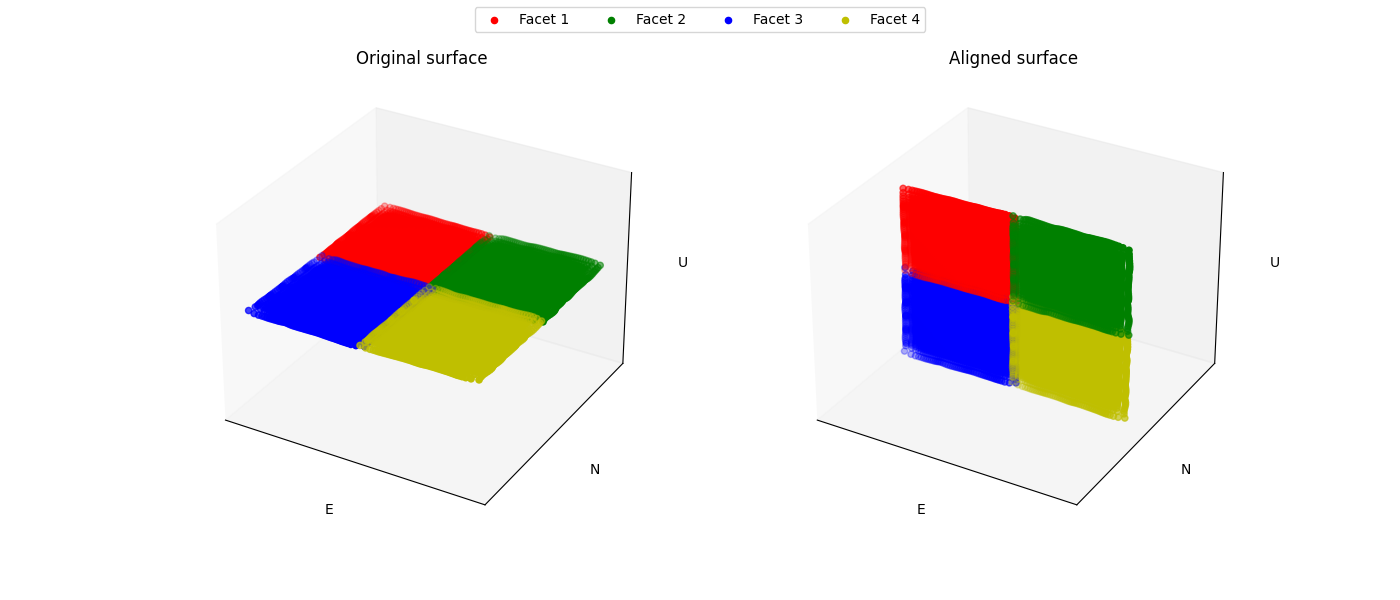
Since both the target area (receiver) and the sun are directly to the south of the heliostat field, this alignment is completely plausible. The heliostat is rotated 90 degrees along the east axis to reflect the sunlight back in the direction it is coming from.
Ray Tracing
With the heliostats now aligned, it is time to perform some ray tracing to generate flux density images.
In this tutorial, we are considering heliostat ray tracing. Heliostat ray tracing (as it’s name suggests) traces rays of sunlight from the heliostat. If we were to trace rays from the sun, then only a small portion would hit the heliostat and even a smaller portion of these rays would hit the receiver. Therefore, heliostat ray tracing can be computationally efficient. Concretely, the heliostat ray tracing involves three main steps:
We calculate the preferred reflection directions of all heliostats. This preferred reflection direction models the direction of a ray coming directly from the sun to the heliostats, i.e., along the incident ray direction. Specifically, we reflect this ray at every point on the heliostats to generate multiple ideal reflections.
This single ray only models an ideal direction, but we need to account for all possible rays coming from the sun. Therefore, we use our model of the sun to create distortions which we then use to slightly alter the preferred reflection directions multiple times, thus generating many realistically reflected rays.
We trace these rays onto the target area by performing a line-plane intersection and determining the resulting flux density image on the receiver.
Luckily, ARTIST automatically performs all of these steps within the HeliostatRayTracer class! Therefore, ray tracing
with ARTIST involves two simple lines of code. First, we define the HeliostatRayTracer. A HeliostatRayTracer
only requires a Scenario object as an argument and the specification of which HeliostatGroup is currently regarded.
# Create a ray tracer.
ray_tracer = HeliostatRayTracer(
    scenario=scenario,
    heliostat_group=scenario.heliostat_field.heliostat_groups[index_mapping.first_heliostat_group],
)
Internally, a HeliostatRayTracer uses a torch.Dataset to generate rays and the distortion of the preferred
reflection directions, line plane intersections, and calculation of the resulting flux density images. This process
runs parallel for all heliostats in the scenario. It is further possible to use a data-parallel setup for the HeliostatRayTracer
to split the computation along multiple devices. See the tutorial on distributed raytracing.
With everything now set up, we can generate a flux density image by calling the trace_rays() function with the
desired incident ray directions, the active heliostat indices and the target area indices (for this tutorial we use the receiver).
# Perform heliostat-based ray tracing.
image_south = ray_tracer.trace_rays(
    incident_ray_directions=incident_ray_directions,
    active_heliostats_mask=active_heliostats_mask,
    target_area_mask=target_area_mask,
    device=device,
)
If we plot the output, we get the following flux density image!
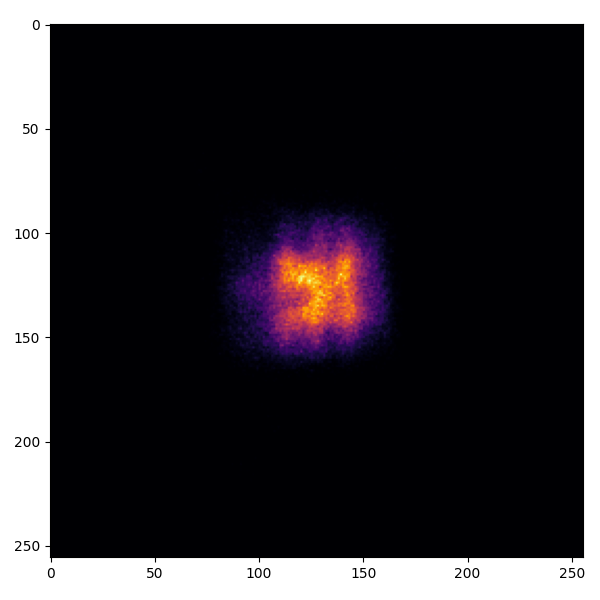
That’s it – a simple example of heliostat ray tracing with ARTIST!
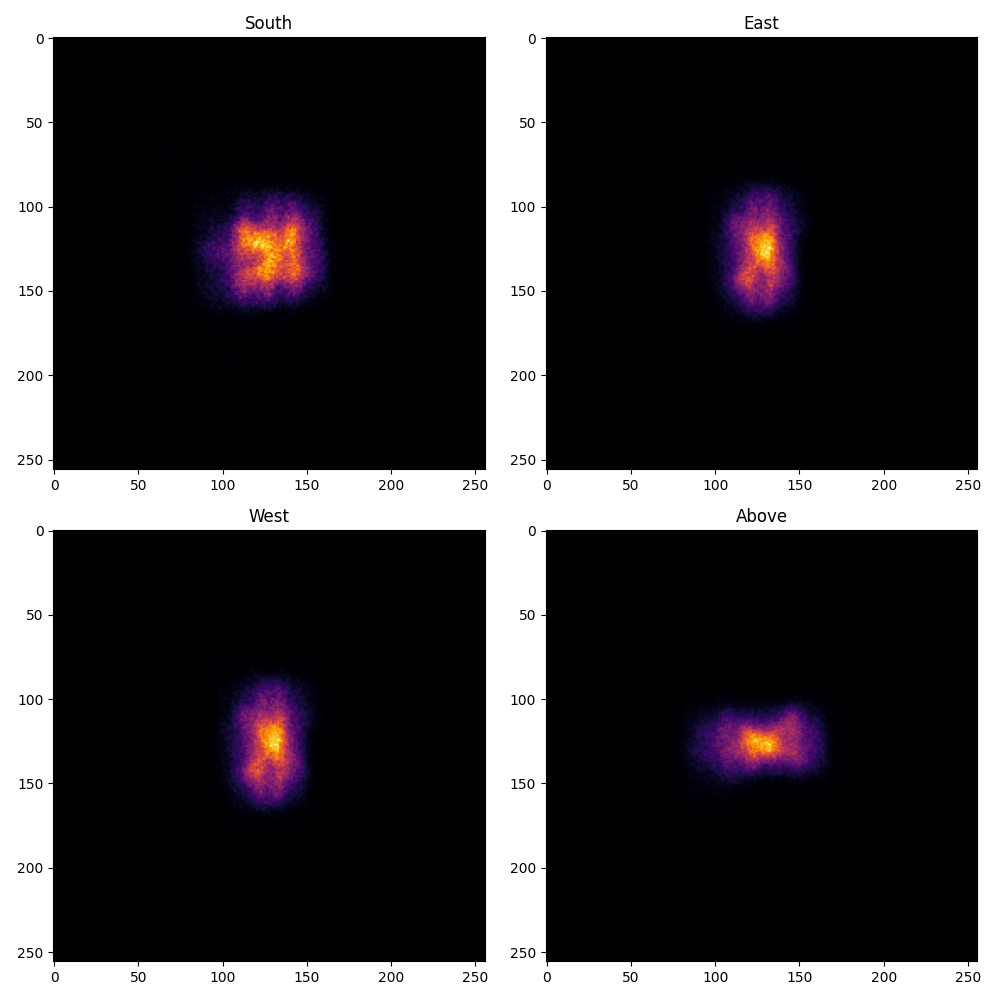
Of course, this one scenario is capable of performing ray tracing for any incident ray direction. For example, we can consider three further incident ray directions and perform ray tracing using a helper function that combines alignment and ray tracing with the following code:
# Define light directions.
incident_ray_direction_east = torch.tensor([[-1.0, 0.0, 0.0, 0.0]], device=device)
incident_ray_direction_west = torch.tensor([[1.0, 0.0, 0.0, 0.0]], device=device)
incident_ray_direction_above = torch.tensor([[0.0, 0.0, -1.0, 0.0]], device=device)

# Perform alignment and ray tracing to generate flux density images.
image_east = align_and_trace_rays(
    light_direction=incident_ray_direction_east,
    active_heliostats_mask=active_heliostats_mask,
    target_area_mask=target_area_mask,
    device=device,
)
image_west = align_and_trace_rays(
    light_direction=incident_ray_direction_west,
    active_heliostats_mask=active_heliostats_mask,
    target_area_mask=target_area_mask,
    device=device,
)
image_above = align_and_trace_rays(
    light_direction=incident_ray_direction_above,
    active_heliostats_mask=active_heliostats_mask,
    target_area_mask=target_area_mask,
    device=device,
)
If we were to now plot the results of all four considered incident ray directions, we get the following image:
We hope this tutorial gave you an idea of how ARTIST works - check out further tutorials for a more in depth
demonstration of what you can do with our software!
Note
The images generated in this tutorial are for illustrative purposes, often with reduced resolution and without
hyperparameter optimization. Therefore, they should not be taken as a measure of the quality of ARTIST. Please
see our publications for further information.